Why Rating Scales Matter
TeamMaven uses a single, definitive Rating Scale across all performance modules (Reviews, Goals, and Role Expectations) to ensure consistency in performance language company-wide. This scale defines both the numerical Value (e.g., 1.0 to 5.0) and the text Label (e.g., "Meets Expectations") used for all ratings.
Consistency: A single scale removes confusion and ensures managers and employees speak the same performance language.
Accuracy: The numerical value enables TeamMaven to calculate the Final Calculated Rating for each review element accurately.
Where to Find Rating Scales
Only Admins can create and update rating scales.
- Go to Reviews in the main navigation.
- Select Rating Scales > List.
- Here you can view and edit all existing scales, or click Create to build a new one.
Creating a New Rating Scale
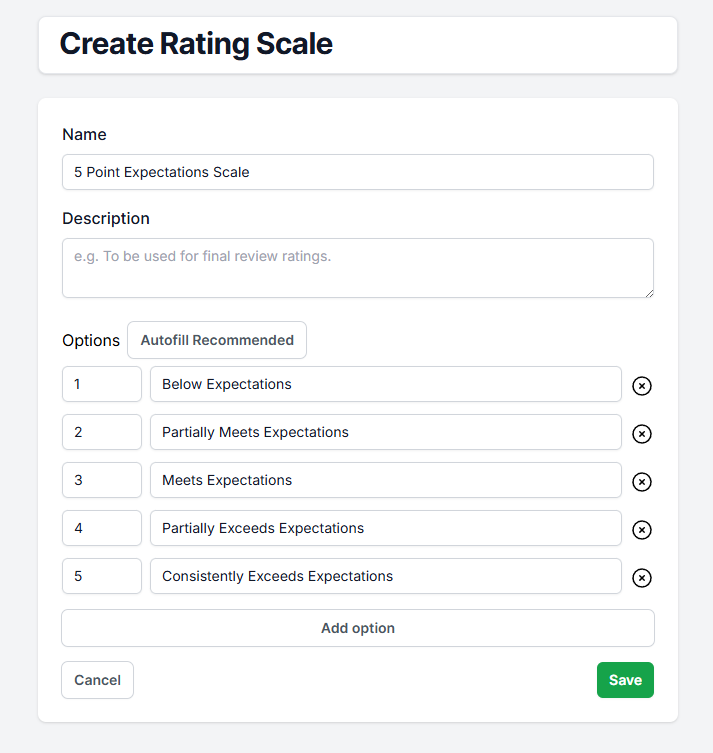
When naming a scale, think about how it will be used across the organisation (e.g., "Performance 4-Point Scale").
- Click the Create button.
- Enter a descriptive Name and a short Description for the scale.
- Use the Add Option button to begin defining your scale points.
Defining the Scale Options
Each scale point needs a user-friendly label and a precise numerical value.
Text: This is the label the user sees (e.g., "Exceeds Expectations").
Value: This is the numerical score the system uses for averaging (e.g., 4.0).
The Values must be sequential and logically match the Text. For example, a 5-point scale should range from 1.0 to 5.0.
Using the Default Scale in Reviews
The scale you manage here is designated as the organisation's default.
- When you create a new Review Round, this default scale is automatically set as the FinalRatingScaleQuestionId.
- All forms, goals, and role expectations pulled into that review round will use this scale for scoring.
- Changing the scale in Rating Scales will only affect future review rounds and modules. It will not retroactively change scales on any active or historical reviews.
Was this article helpful?
That’s Great!
Thank you for your feedback
Sorry! We couldn't be helpful
Thank you for your feedback
Feedback sent
We appreciate your effort and will try to fix the article